Free Online Tool
Domino Maker
with Images or Text
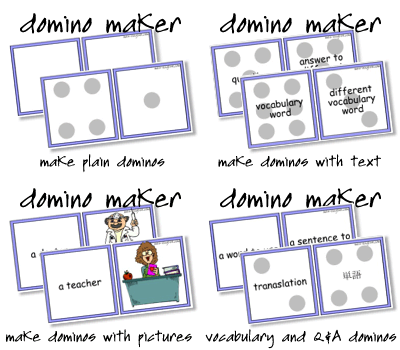
Print custom dominoes with vocabulary images, text, or both. 10 dominoes per page, cut and play. Great for classrooms, language learning, parties, and ice-breakers.
Free Online Tool
Print custom dominoes with vocabulary images, text, or both. 10 dominoes per page, cut and play. Great for classrooms, language learning, parties, and ice-breakers.
50+ vocabulary categories - animals, food, sports, and more.
Image-image, text-text, mixed image and text, or classic dots.
Prints 10 dominoes per page, ready to cut and play.
Language, science, math, social studies - text mode works for anything.
Party games, ice-breakers, and conversation starters.
Vocabulary image on both halves. Students match images and name them as they play. Great for any vocabulary category.
Any words, numbers, or phrases on both halves. Works for any subject - math facts, definitions, translations, questions and answers.
Image on one half, word or phrase on the other. Students match the image to its label - great for vocabulary with a reading component.
Traditional domino dots with optional custom text overlay. Add conversation prompts or questions to the dot positions for a twist on the classic game.
Cut out the dominoes and distribute them evenly to all players. The infographics below explain the two key rules - basic chain play and what to do with double pieces.
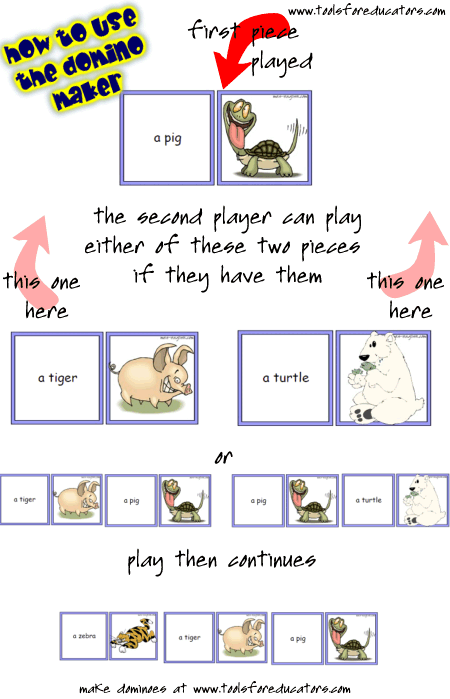
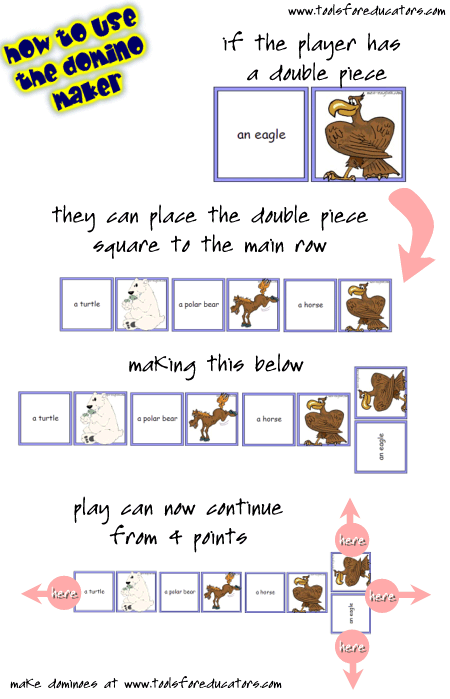
Distribute all dominoes evenly to all players. The first player places one domino and performs the content task for both halves - say the word, answer the question, complete the prompt.
The next player connects a domino to either open end, performing the task for the connecting half only. If a player can't play, they pass. First player to place all their pieces wins. If nobody can play, the player with the fewest pieces left wins.
Draw pile: Deal only 5-7 pieces to start. If a player can't play, they draw from the pile instead of passing. Keeps the game moving longer.
Pass penalty: When a player has to pass, they complete a bonus task - make a sentence, answer an extra question, or anything you set.
Party and ice-breakers: Use text mode with dots and add conversation prompts - "One time when I was a child...", "I have never...", "Next year I want to..." Players finish the prompt as they place their piece.
Choose images, text, mixed, or dots - 10 dominoes per page, print and cut.